The config dashboard
/config dashboard (admin) is your server's settings panel. The home screen is a status card — every setting and its current value at a glance, with an Edit button beside each section — so "what's still unconfigured?" never requires guesswork.
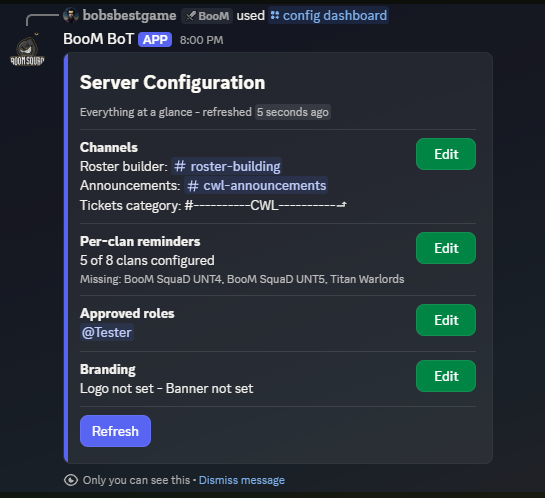
Channels
Where the bot posts. Three to set:
| Channel | What lands there |
|---|---|
| Announcements | Published rosters, plain text with pings |
| Reminders | Live roster posts with movement markers |
| Review | Roster previews, claim approvals, amend audits, flag disputes |
Channel pickers are searchable; setting a channel takes effect immediately.
Per-clan reminders
Optionally route each clan's reminder post to its own channel — families that give each clan a private channel use this so lineups land where that clan actually talks. Clans without an override use the main reminders channel. Overrides can be cleared per clan at any time.
Roles
The approved roles that grant the leadership tier. Add or remove roles here; because this is effectively handing out management access, both adding and removing ask for confirmation before saving — the one place in the dashboard that does.
Branding
Remove the server's uploaded logo or banner from here. Uploading is done with /config branding, since dashboards cannot accept file attachments.