First-time setup
Five steps take a fresh invite to a working CWL server. Steps 1 and 2 need a server admin; the rest can be done by anyone you give the approved role to.
1. Configure channels and roles
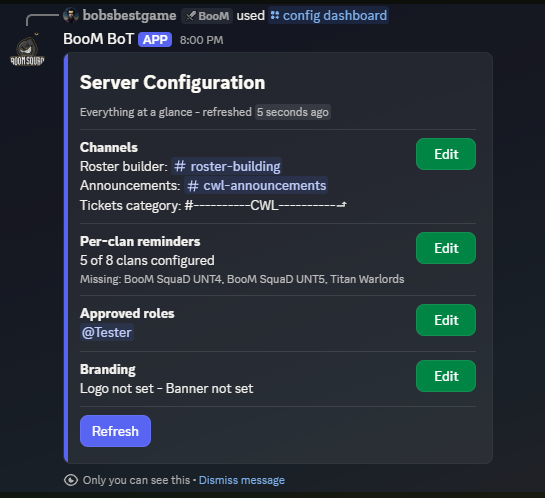
Run /config dashboard (admin only). This opens the server configuration panel where everything lives:
- Channels — where announcements, reminders, and roster review posts go.
- Roles — the approved roles that unlock leadership commands like the roster dashboard for people who are not server admins. See Permission tiers.
- Per-clan reminder channels — optionally route each clan's war reminders to its own channel.
The dashboard shows its current state on the home screen, so you can always tell what is still unset.
2. Set your branding (optional)
Run /config branding to upload a logo and banner. They appear on roster DMs and published posts. There is no default — until you upload something, posts simply render without images. Details on the Branding page.
3. Link your clans
Open /link dashboard and use the Clans section to link each clan in your family by its in-game tag. The bot validates the tag against the Clash of Clans API before saving. Everything else — rosters, signups, the registry — only sees clans linked to your server.
4. Populate the registry
The registry is the bot's list of Clash of Clans accounts and which Discord user owns each one. You have several ways to fill it, from fastest to most gradual:
- Bulk import — if your family already uses ClashPerk,
/link bulkimports an entire exported member list in one shot. See Bulk import. - Claim board — post a public board where members claim their own accounts, with leader review. See The claim board.
- Self-service — members link themselves anytime through
/link dashboard. - Automatic — the bot polls your linked clans and adds current members' accounts on its own; it also mirrors links made through ClashPerk. Discord ownership still needs one of the methods above.
5. Run your first CWL
Post signups with /signups post, then open /roster dashboard and hit Build when you are ready to assemble lineups. The Rosters section walks the whole cycle.
That's it. The bot keeps clan membership and town-hall data fresh in the background from here on.