Signups
Signups answer the first question of every CWL: who is actually playing this month? Members opt in (or out) once, and the roster builder shows their answers while you assemble lineups.
Posting signups
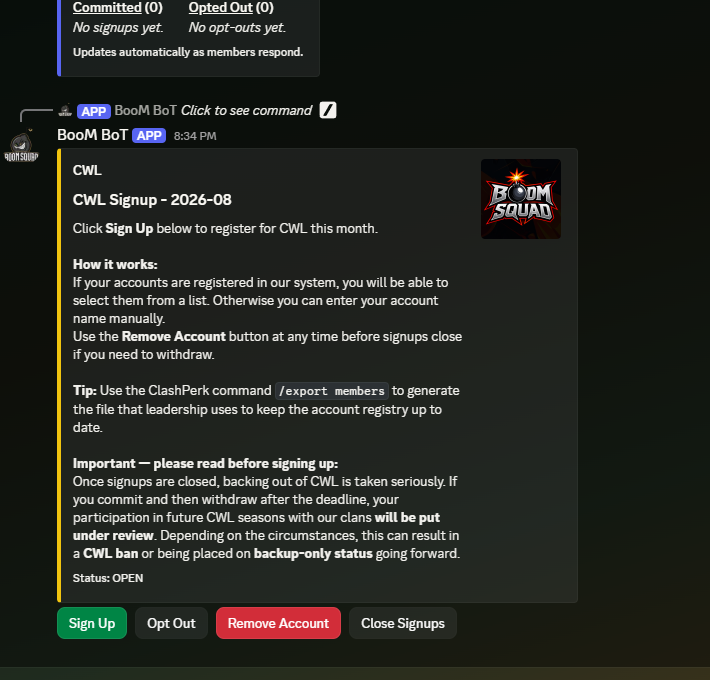
/signups post (leadership) drops the signup message in the current channel. Members click to sign up their accounts for the active month — linked accounts make this a two-click affair, and members without links can still enter an account by name.
Members can also explicitly opt out, which is genuinely useful information: a leader scanning the builder can tell "didn't respond" apart from "told us no."
Viewing results
/signups view is open to everyone and takes a month plus an output format:
- Embed — a private summary right in Discord.
- .txt file — a plain list.
- .csv file — for Excel or Google Sheets.
- Opted Out list — just the members who said no.
Managing the month
/signups open (leadership) re-opens signups for the current month after they have closed — say a straggler comes back from vacation.
/signups reset (admin) wipes a chosen month's signups entirely. The bot writes a CSV backup before deleting, so a mistaken reset is recoverable.
Months
Signups follow the same month convention as everything else: YYYY-MM, with a .5 suffix (2026-07.5) available for a rare second CWL in one calendar month. See the FAQ for details.